
Why Use an External CSS for Your Google Shopping Campaigns?
Discover the benefits of external Comparison Shopping Services (CSS) for your Google Shopping campaigns: lower costs, better performance and hands-on support. A complete guide to improving your advertising ROI.
 Benoit Jacques10 February 20256 min read
Since Google introduced Comparison Shopping Services (CSS) in 2018, advertisers have had a new way to optimise their Shopping campaigns: external CSS partners. This reform, imposed by the European Commission to open a previously monopolistic service to competition, lets e-commerce brands lower their cost per click (CPC) while improving performance. Let’s look at the benefits of this strategy.
What is an external CSS?
A CSS (Comparison Shopping Service) is a Google-certified partner that serves Shopping ads through price comparison services. Unlike traditional Google Shopping, where Google acts as the direct intermediary, a CSS lets you run your campaigns through a third party while benefiting from significant CPC discounts.
How does an external CSS work?
When an advertiser chooses a CSS, the CSS adds the product feeds to its own Merchant Center account and serves the campaigns on behalf of the comparison service. The “By Google” label is replaced with “By [CSS name]”, with no impact on ad quality or reach.

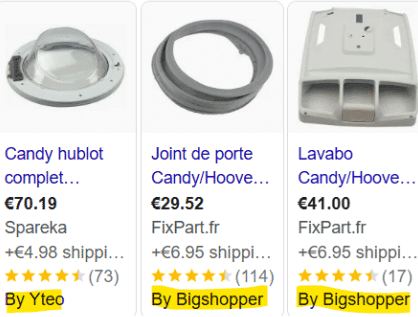
Key benefits of an external CSS
Lower advertising costs
A CSS lowers your CPCs thanks to exclusive discounts granted by Google. These discounts, which can reach up to 20% of the ad budget, are applied directly at auction time, making your campaigns more competitive. Read our article on how to optimise your Google Ads budget.
Better performance
CSS partners are certified by Google and receive in-depth training to maximise return on investment (ROI). Their expertise allows finer campaign management and a smarter budget allocation strategy.
Flexibility and support
Working with an external CSS requires no change of account or account manager in Google Ads. Some CSS partners also offer free setup, which makes the switch even easier.
Access to financial incentives
Google offers ad credits to advertisers who adopt this solution, further reducing overall campaign costs.
When should you use a CSS?
This solution is particularly relevant for:
- E-commerce brands looking to optimise their ad budget without compromising performance.
- Businesses with a large product catalogue in Shopping Ads.
- Competitive markets where bids are very high.
How do you sign up with an external CSS?
- Choose a CSS partner Look for a certified, well-established CSS that fits your needs. Our two favourites at Donutz are Product Hero and Channable, both of which work on a fixed-fee basis.
- Link your Merchant Center account The CSS will send you an invitation that you need to accept in your Merchant Center account.
- Integrate your product feeds Once connected, your feeds are migrated for optimised delivery.
- Launch your campaigns Resume your activity with lower CPCs and a higher ROI.
Conclusion
By choosing an external CSS, e-commerce brands can cut their advertising costs significantly while improving the performance of their Shopping campaigns. Simple to set up and backed by certified partners, this strategy is a must-have opportunity to maximise the profitability of your ad spend.
To go further, read our article on 7 ways to segment your PMax and Shopping campaigns.
At Donutz, we turn your ad budget into concrete results: qualified traffic and growing sales. We handle everything from A to Z, so you can enjoy the fruits (or rather the donuts) of your success. Let’s talk about your project !
Ready to grow your digital marketing?
Get a free audit from our experts — no commitment.